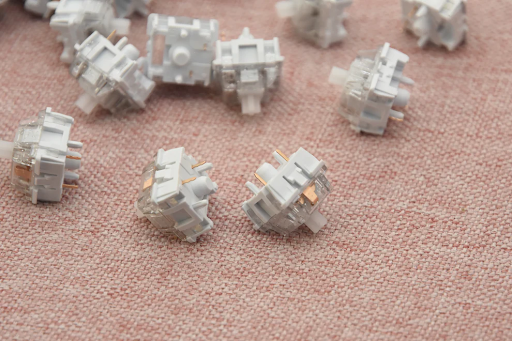
Tactile keyboard switches remain one of the most popular choices for professionals, typists, gamers, and mechanical keyboard enthusiasts who prefer a satisfying mechanical feel without excessive noise. This guide evaluates the best tactile keyboard switches available today based on expert testing, user feedback, real-world performance, and durability data from leading manufacturers. Whether you are upgrading from a membrane keyboard or improving your current mechanical setup, this article provides practical, reliable insights to help you make an informed decision.
What Are Tactile Switches?
Tactile switches are mechanical switches designed to provide a noticeable “bump” during keystrokes. This tactile bump occurs at the actuation point, offering physical confirmation that the keypress has been registered. This feature helps typists avoid bottoming out and increases typing accuracy. Many users describe tactile switches as a comfortable middle ground between smooth linear switches and the loud, crisp feel of clicky switches.
Manufacturers such as Kailh and Cherry outline tactile switches as suitable for users who want mechanical feedback without significant noise. Typists and programmers often prefer them because the mid-key bump improves rhythm and helps reduce accidental key presses. The tactile sensation can also assist in maintaining consistent typing speed over long sessions.
Because tactile switches offer a responsive but quieter experience, they’re ideal for offices, classrooms, shared spaces, and home workstations. Their moderate sound profile provides mechanical satisfaction without disturbing others, making them one of the most versatile switch types for everyday computing.
Top Tactile Keyboard Switches — Expert Reviews & Ideal Use Cases
The following switches are chosen based on performance tests, user feedback from communities such as Drop, Keychron, and Reddit, and practical suitability for work and home use.
1. Gateron Type R Tactile Switch
Type R switches deliver a deep, resonant “thock” sound and a strong tactile bump. They are ideal for writers and programmers who want an expressive tactile feel without excessive noise. Many enthusiasts consider U4T one of the most premium-feeling tactile switches on the market.
2. Outemu Honey Lime Silent Tactile
This is a silent tactile switch designed for extremely quiet operation. With cushioned bottom-out and smooth travel, it is perfect for offices and shared environments. Users consistently praise its build quality and silent performance.
3. MMD Holy Panda
Holy Pandas are known for their iconic sharp tactile bump and satisfying return force. They are often recommended to those who want a “classic” enthusiast tactile experience. Their snappy feedback makes them excellent for typing-heavy workflows.
4. HMX Firecracker tactile switch
A cost-effective tactile switch with a medium bump and smooth action. Its affordable price makes it a great entry point for mechanical keyboard beginners looking to explore tactile switches without overspending.
5. Brown Switches (Cherry MX Brown, Gateron Brown, HMX K01)
Brown switches offer gentle tactile feedback that closely resembles a traditional office keyboard—just more refined. They are an excellent starting point for users upgrading from membrane keyboards.
How Should I Choose the Best Tactile Switch for Typing vs Gaming?
Choosing a tactile switch depends on your typing habits and whether you prioritize speed or comfort. For typing-intensive tasks such as writing, coding, legal work, or data entry, a pronounced tactile bump can improve accuracy by providing immediate feedback. Switches like Holy Panda or Boba U4T offer this noticeable feedback.
For gaming, however, overly strong bumps may slow down rapid keystrokes. Gamers often benefit from lighter tactile switches with smoother action, such as Akko Lavender Purple or Gateron Brown. These maintain feedback without compromising speed.
You should also consider actuation force. Lighter switches (45–55g) reduce fatigue during fast action, while medium-force switches (55–65g) offer better control for typing.
If unsure, using a switch tester from trusted brands such as Keychron or Kinetic Labs allows you to try multiple tactile switches before fully committing to a keyboard build.
Conclusion
From silent office-friendly options to punchy enthusiast favorites, tactile switches are extremely versatile and practical for most users. Understanding the feel, sound, and performance characteristics of tactile switches helps you choose the best tactile keyboard switches for your typing style and environment. With the right switch, your keyboard can become more comfortable, more accurate, and more enjoyable to use daily.
FAQs
What makes a tactile switch different from linear and clicky switches?
Tactile switches provide a noticeable bump during actuation, while linear switches offer smooth, uninterrupted travel. Clicky switches add both a bump and an audible click. Tactile switches balance feedback and quietness, making them suitable for most environments.
Are tactile switches good for both typing and gaming?
Yes. Tactile switches are excellent for typing due to their feedback bump. For gaming, they can still perform well—especially lighter tactile switches—though competitive gamers may prefer linears for maximum speed.
How long do tactile switches usually last and can I improve their feel?
Most tactile switches last between 50 and 80 million keystrokes. Their feel can be improved with lubrication, switch films, and regular cleaning. These maintenance steps can increase smoothness and extend switch lifespan.